
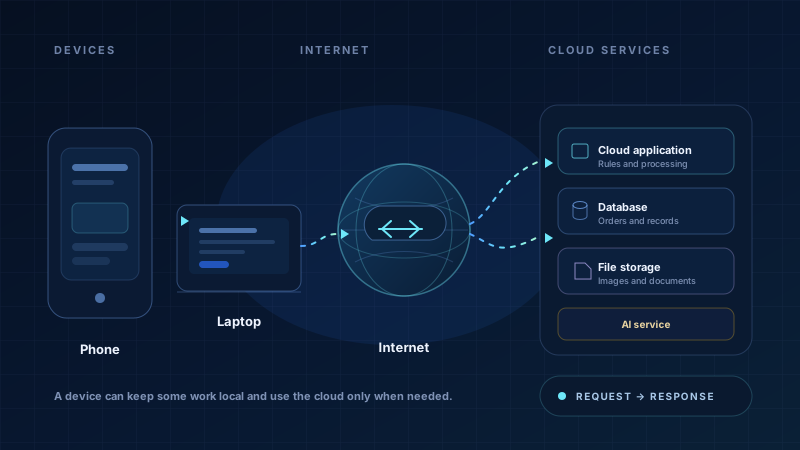
Cloud computing sounds abstract, but the basic idea is simple: you use computers that belong to someone else, connected through the internet, instead of keeping every piece of hardware in your own room. The cloud may store photos, run a website, answer a request or help train an AI model.
For many modern applications, the cloud acts like a shared office building. A business can rent the space it needs, use the water and electricity, and expand later. But renting also brings rules, bills, dependence on the building owner and a need to protect whatever is kept inside.
What a cloud service is
A cloud service is a computing service provided over a network. The provider owns and maintains the physical machines in a data centre. You use part of that capacity through an account, usually paying for what you use or reserving a monthly plan.
The provider may manage the power, cooling, hard disks and network. You still manage your application, your accounts, your data and your choices about who can access them. “Cloud” does not mean “someone else is responsible for everything”.
You own the machine and its limits
- Works without an internet connection for local files
- You buy, repair, back up and replace the hardware
- A power cut, theft or disk failure can stop everything
- Sharing access with people far away is harder
You rent capacity over the internet
- Reachable by many users if the service is online
- Capacity can be increased without buying a server
- You depend on connectivity and the provider
- You still need backups, access rules and cost control
What cloud services can support
A modern application often uses several remote services rather than one large computer. A school website, a small shop's ordering page or a mobile app may use cloud services for different jobs:
Websites and applications
A remote server runs the app and sends pages or data to a browser. It can be available to customers in other cities without a local machine.
Databases
Orders, accounts and records can be stored in a managed database, with backups and access controls configured by the team.
Storage, files and messages
Photos, invoices and documents can be stored remotely. Separate services may send email, SMS notifications or payment requests.
AI and data processing
An AI model may run in the cloud because it needs powerful hardware. Data may also be processed in batches or analysed for reports.
Many cloud services are used through APIs. A map, payment, messaging or AI service can be called over an API, so the application does not have to run that service itself. The API still has access rules, and its use may add to the bill.
These are common building blocks, not a required shopping list. A small application may need only one of them. Another may run almost entirely on a phone.
A simple request to a cloud service
Imagine a small sweets shop taking festival orders through a website. A customer chooses a box, pays and receives a confirmation. The request travels through several remote parts before an answer appears.
Not every application needs the cloud
Some applications work entirely on the device. A calculator, a notes app or a simple offline learning game may never send personal information anywhere. This can be private, fast and useful in places with poor connectivity.
Other applications use remote services for almost everything. A large online shop needs shared stock, payments and order records that many devices can see. A third approach combines both.
Private and offline
The phone does the work and keeps the data. Useful when the task is local, sensitive or must work without a network. Updates and backups are harder.
Shared and reachable
Cloud services store shared records and do heavy processing. Useful for many users and changing information, but depends on connectivity and careful access control.
A practical mix
The app keeps some data on the phone and sends only what is needed. A farmer's advisory app, for example, may save notes offline and fetch a weather update when a connection is available.
Why cloud services matter
The main benefit is that a small team can reach users without buying and maintaining every piece of hardware. Capacity can be increased during a busy season. Managed backups, databases and AI services can reduce some kinds of setup work. A business can start small and change direction without replacing a room full of servers.
The cloud can also make it easier to work from different places. Support staff can see the same record, a developer can deploy a fix without visiting an office and a customer can order from another city. Those benefits depend on a reliable connection and a system that is designed to use it safely.
The costs and responsibilities do not disappear
- Money: cloud bills can grow with storage, data transfer, processing and extra services. A design that is cheap for ten users may be expensive at scale, or the other way around.
- Internet: if users have weak connectivity, a cloud-only design may fail. Offline behaviour and small downloads need to be planned.
- Security: the provider protects the physical data centre, but the team still has to protect accounts, keys, permissions and application bugs.
- Privacy and law: personal data may be stored in another region and handled by several providers. The organisation must understand its duties and obtain proper consent.
- Provider dependence: moving away can be difficult if the application uses special services or if exporting data is slow and costly. Ask how data can be retrieved.
- Complexity: more services mean more settings, bills, logs and failure points. A simpler design is often easier to operate.
An application is useful because it solves a problem reliably. A large, expensive cloud setup can still be slow, insecure or hard to understand. Sometimes a smaller design is the better engineering choice.
How to decide what fits
Start with the people and the conditions in which they will use the application. A shop that needs shared orders and online payments may need cloud services. A personal note-taking app may work well without them. A school may need a shared database but keep sensitive reports away from public services.
Ask what happens when the internet fails, how much the service will cost at a busy time, who can see the data, how backups are tested and how the organisation would leave if the provider changed its terms. These questions are more useful than deciding that “cloud” is always modern or always risky.
Key takeaways
- Cloud computing means using remote computers, storage and services over a network instead of keeping all hardware in one place.
- Cloud services can run websites, databases, file storage, APIs and AI processing, but they are not required for every app.
- Some applications work entirely on a device, some rely on remote services, and many combine both approaches.
- The cloud can help an application grow and reach users, but it brings costs, internet dependence, security duties and provider dependence.
- The right choice depends on the people using the app, the data involved, connectivity and who will operate the system.