
Before a house is built, someone has to decide how many rooms it needs, where the water pipes will run, how people will enter and what should happen if a power line fails. The paint and furniture come later. Software architecture is the same kind of planning for an application.
It is not a diagram for its own sake. Architecture is the set of decisions that make a system easier to build, change and operate. AI can help people ask better questions and compare options. It cannot take responsibility for the plan.
What software architecture means
A software system is usually made of several parts. A mobile app or website shows information. A backend applies the rules. A database stores records. Other services may send messages, take payments, check a location or provide an AI model. Architecture describes how those parts fit together.
For a house, the plan might say that the kitchen needs a separate water line, the upstairs bathroom needs stronger support and the front door should be reachable without steps. A software plan asks similar practical questions: where does data live, which part is allowed to change it, what happens during a power cut, and how will the system cope when more people arrive?
The decisions a plan has to cover
- Parts and boundaries: which jobs belong in the mobile app, the website, the backend, the database or an outside service.
- Connections: how the parts talk to each other, what information passes between them and what happens when one part is slow or unavailable.
- Data: what is stored, who owns it, how long it is kept and who is allowed to see or change it.
- Growth: what happens when there are ten users, ten thousand users or a sudden rush during an admission week or a festival sale.
- Failure: how the system behaves when the internet drops, a payment service is down or a background job is delayed.
- Privacy and security: how personal information is protected, how access is checked and how problems are recorded.
- Operations and cost: who runs the system, how it is monitored and what it costs to keep running.
A simple example: a school management system
Imagine a system used by parents, teachers and office staff. Parents need fee details and attendance. Teachers need to mark attendance. The office needs to correct records and send notices. The system may also send an SMS or email and accept an online payment.
A plan has to decide whether each school gets its own separate data, or whether one shared service holds records for many schools. It has to decide who can see a child's information, how a failed payment is retried and how a correction is recorded. It has to cope with a busy morning when many teachers open the app at once.
None of these choices is automatically “modern”. A single well-run server may be the right answer for a small school. A larger group may need separate services and a team to operate them. The right plan depends on the real need, the budget and the people who will maintain it.
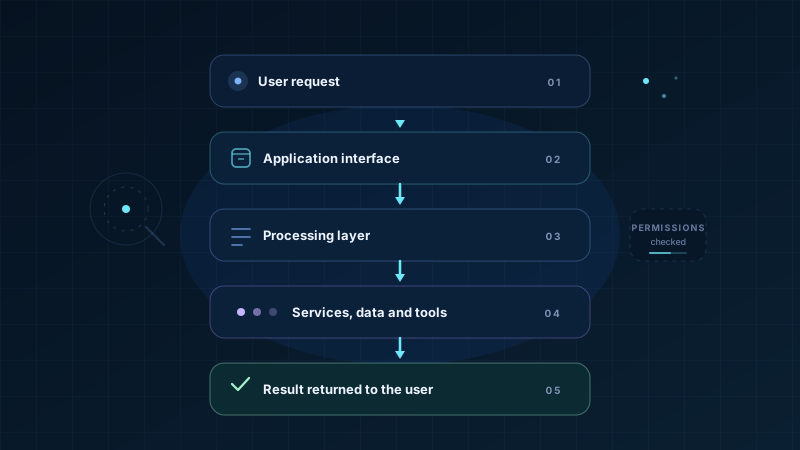
What a request looks like
This is a simplified path for one action, such as a parent checking a fee receipt. Security checks and monitoring surround the whole path; they are not a single box at the end.
Planning for growth, failure, privacy and security
Growth
More users can slow a database, overload a small server or create long queues. A plan should say what will be measured and how the system can grow without a rewrite.
Failure
Networks drop. Services time out. A payment may succeed while the confirmation fails. The system should retry safely, avoid duplicate charges and tell the person what is known.
Privacy
Collect only what is needed. Decide who can see it, how long it is kept and how a request to correct or delete it is handled. Children's records need particular care.
Security
Check identity and permission at the backend, not only in the app. Protect secrets, validate input, record important changes and plan how to respond to a breach.
These concerns affect one another. Adding a faster database may cost more. Keeping every record forever may create privacy risk. Sending data through an outside AI service may change who can see it. A useful architecture makes these trade-offs visible instead of hiding them in code.
How AI can help with the plan
AI can be a useful thinking partner before a team commits to a design. It can ask questions a person might forget, propose several ways to divide an application, explain an unfamiliar pattern or turn notes into a first diagram. It can also review a draft and point out that failure handling, backups or access rules have not been described.
Explore and explain options
- Draft questions about users, data and peak load
- Compare two or three possible designs
- Turn a description into a simple sequence diagram
- List common failure points and missing decisions
- Explain a technical term in simpler language
Choose and own the system
- What the organisation actually needs and can afford
- Legal duties, consent and data-retention rules
- Which risks are acceptable and who approves them
- Whether a security or privacy claim is true
- Who is accountable when something fails
An AI-generated design is a starting point, not a certificate. It may use a pattern that does not fit a small team. It may add complexity that no one can operate. It may miss a local rule or a failure that only appears under real load.
Questions to ask before accepting a design
- Can we explain the main parts and their responsibilities in plain language?
- What happens when a connection, a payment or a background job fails?
- Who can see each kind of data, and how is that checked?
- What is the plan for growth, backups, monitoring and support?
- Which parts are essential, and which could be removed to keep the system simpler?
- Has someone tested the risky assumptions with a small prototype?
Good architecture makes the system easier to understand, change and repair. A fashionable diagram is not useful if the team cannot operate it, afford it or explain it to the people who depend on it.
Key takeaways
- Software architecture is the practical plan for how the parts of a system fit together and how it will be built, changed and operated.
- A plan has to cover parts, connections, data, growth, failure, privacy, security and cost.
- The right design depends on the real need, budget and team. A fashionable pattern is not automatically a good fit.
- AI can suggest options, ask useful questions and draft diagrams, but people must decide requirements, risks and accountability.
- An AI-generated design still needs review by people with the right knowledge, plus testing against real conditions.